How to Play Fire Balls Shoot 3D
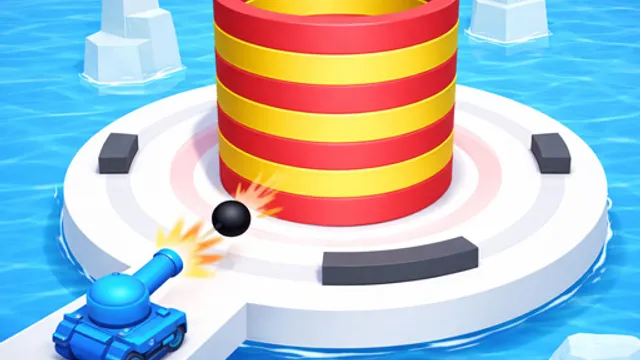
There’s a tower of targets above you and a cannon below it. That’s the entire setup, and it’s enough. You fire upward, chunks of the stack break apart, and the tower comes down piece by piece until there’s nothing left. Between your cannon and the tower sit moving obstacles — barriers that swing, rotate, and generally sit exactly where your shot wants to go. Every shot you fire either lands on the target or gets eaten by a barrier, so the game is one long series of small timing decisions.
The pace is what turns something this simple into a test. Firing feels good, so the natural instinct is to hold the button down and spray, and that instinct is wrong most of the time. Barriers move on their own rhythm, and hammering the trigger means half your shots hit metal instead of tower. As the stacks get taller and the barriers get busier, the game asks you to slow down and read a pattern before committing, then dump everything you have the moment a gap opens. It’s a short-burst kind of game, easy to pick up for thirty seconds, and the sort of thing that quietly eats twenty minutes.
Tips for Longer Smashing Streaks
- Watch a full barrier cycle before firing. Every obstacle repeats. One pass of observation tells you where the opening is and how long it stays there, which is worth more than a dozen hopeful shots.
- Fire in bursts, not a stream. Empty your shots while the gap is open, then stop. Continuous fire wastes half your output on barriers and gives you nothing back.
- Aim at the weakest part of the stack. Targets closest to breaking collapse the fastest and clear the path for what’s behind them. Chipping evenly across a tower takes far longer than focusing.
- Reset your rhythm after a miss. A blocked shot usually means you’re firing on the barrier’s timing instead of your own. Pause for one cycle and start again on the beat rather than trying to catch up.
Frequently Asked Questions
Is Fire Balls Shoot 3D free to play?
Yes. It loads straight into your browser at no cost.
How do I control it?
One input, nothing else. Click with the mouse or tap the screen to fire. All the difficulty lives in when you press, not how.
Does it work on a phone?
It does, and the tall portrait layout is built for it. Tapping to shoot is arguably more natural on touch than with a mouse.